
A strata committee member is a resident with a committee position on their profile. Committee members don't get Building Manager access. Instead, you share information with them through the Strata Committee group.
How to set a committee position
Step 1: Go to Residents and select the resident's name. This opens their apartment.
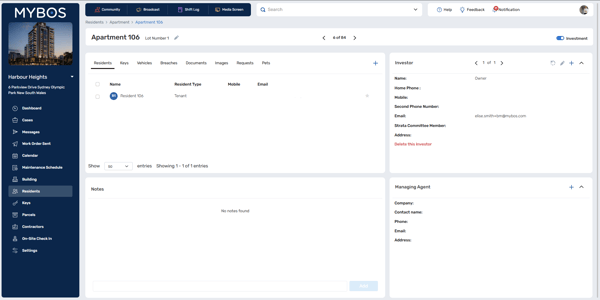
Step 2: Select the resident's row to open their profile.
Step 3: Select the pencil icon at the top of the profile.
Step 4: Under Strata Committee Member, choose Chairperson, Treasurer, Secretary or Member.
Step 5: Select Save.
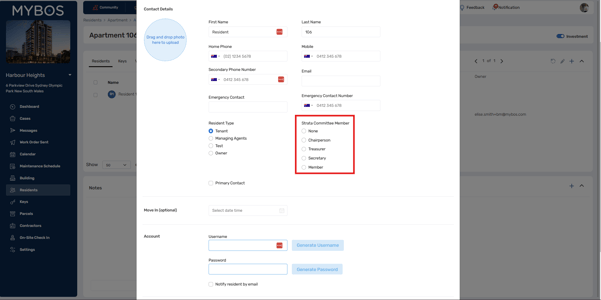
Step 6: To remove someone from the committee, follow the same steps and choose None.
Where committee members appear
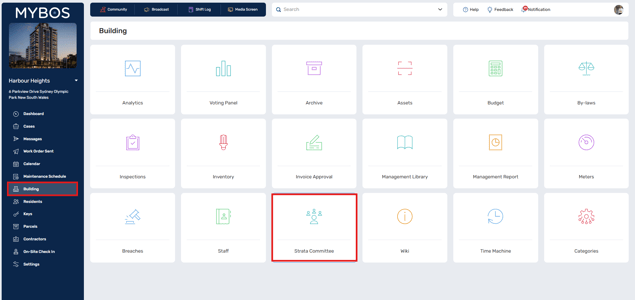
- Building > Strata Committee lists every committee member with their apartment and position.
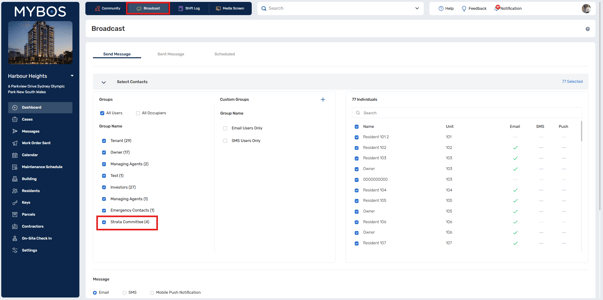
- Broadcast includes a Strata Committee group, so you can message the whole committee at once.
- Resident Library lets you share files with the committee only. Select the file, select Share, then tick Strata Committee.
Committee members see shared files once they sign in to the Resident Portal or MYBOS app. If a member can't see a file, open their profile and check Resident Portal Status shows Active.