
What is the time machine?
The time machine is a very useful utility if you want to scan the history of work related to an apartment, any particular asset, non-asset or any contractor. For each item, the time machine enables you to view all work that has been done on or done by that entity at your site. Essentially, it provides you a list of all cases or maintenance events attached to the item you are looking for.
Example use: if you wanted to generate a report on all maintenance events for Apartment 409, it is best to do so in Time Machine rather than cases.
How to Generate a Time Machine Report
Step by Step Walkthrough
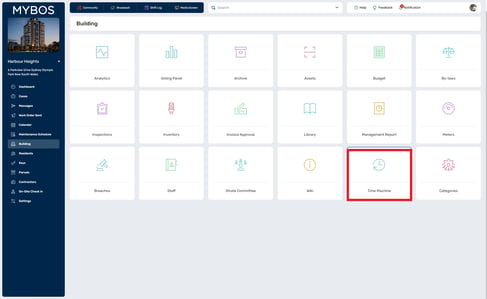
Step 1: Go to Building ➔ Time Machine
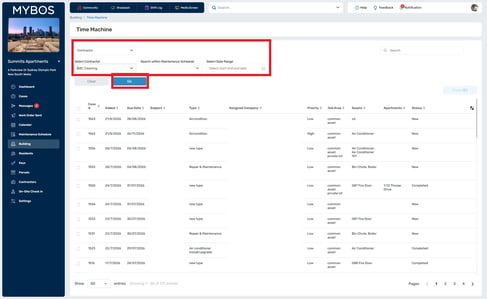
Step 2: Select the type of item you want to review: Asset, Non Asset, Apartment or Contractor.
Step 3: Choose the specific item using the filters. For an Asset, you can narrow the list by selecting a category first.
Step 4: Optionally, enter a keyword in Search within Maintenance Schedule or choose a Date Range.
Step 5: Click Go to generate the time machine report. All of the relevant Cases tied to your filter options will appear in the report.
Exporting Records
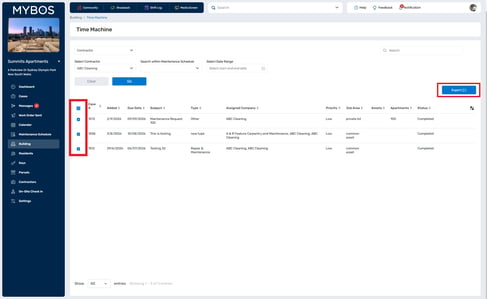
Tick the checkbox next to each record you want to include, or use the checkbox in the table header to select all records on the page, then click Export. The Export button stays greyed out until at least one record is selected.
Note: If you need a report of all maintenance events for an apartment, asset or contractor, use Time Machine rather than Cases. Time Machine is built for reviewing history, while Cases is built for managing individual jobs.
Tips and FAQs
Why is the Export button greyed out? Export is only available once you have ticked at least one record in the results table.
Which should I use for a maintenance history report, Time Machine or Cases? Time Machine. It shows the full history for one apartment, asset, non-asset or contractor in a single view.
Can I see the work a contractor has done at my building? Yes. Choose Contractor as the type, select the contractor and click Go.
How do I narrow the results to a certain period? Use Select Date Range before clicking Go.
How do I find a single asset quickly? Select the asset Category first, then pick the asset. You can also use the search box to find the item by name.
My results look empty. What should I check? Check that you have selected a specific item, that your date range isn't too narrow, and that you are in the correct building (shown at the top left of the portal). Click Clear to reset and try again.
Can I export everything at once? Export includes the records you have ticked in the results table, so select all the records you need before clicking Export.