
The Marketplace feature transforms your Resident Portal into a secure, building‑only trading hub, where residents can easily list items for sale and other residents can quickly browse and buy within the community.
The Marketplace feature enables residents to create and publish listings directly in the Resident Portal, where other residents in the building can view available items and choose to purchase them.
❗Before configuring Marketplace, ensure that the Marketplace feature is activated in Community Settings. Click here to learn how to turn this feature on.
How to Set Up Marketplace
Step by Step Walkthrough
Step 1: Navigate to the MYBOS Building Manager Dashboard.
Step 2: Click the Community tab in the top left. Once open, click the Marketplace widget to open the Marketplace hub.
This is the central hub for Marketplace, where you can view and edit all existing listing and ones pending approval.
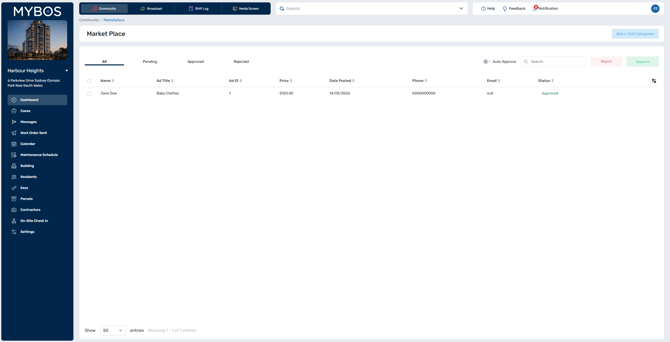
Step 3: For the most streamline experience for you and your residents, it is recommended to configure the Marketplace categories.
💡 Categories help residents organise their listings so others can find them easily. Each item a resident posts must belong to a category.
Click Add or Edit Categories in the top right of the page.
Step 4: Click Add to begin inputting a new category.
Step 4: Type in the Category Name
Some examples include:
- 🏠 Home & Living
- 📱 Electronics
- 🚗 Parking & Storage
- 🕹️ Games & Entertainment
- 🔨 Services
- 👶🏼 Baby & Kids
- 🎟️ Tickets & Events
- 🆓 Free Items
- 🔁 Wanted
- 👗 Clothing & Accessories
Step 5: Click Save
Step 6: Repeat these steps for each category you want to add.
🗒️ Building Managers can choose whether Marketplace posts are auto-approved or require manual review before they appear to residents by toggling Auto Approve on/off.
How to Accept or Reject Marketplace Ads