
On Site Check In
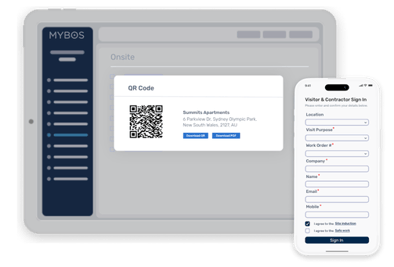
On-Site Check In helps building managers see who is on-site, why they are there, and how long they have been onsite. It supports both contractors and visitors, with check-ins linked to Cases, Work Orders, and Quote Requests where needed.
On-Site Check In gives building managers full visibility over who is on-site, why they're there, and for how long — with contractors and visitors linked directly to Cases, Work Orders, and Quote Requests.
What You Can Do
On-Site Check In works for both contractors and general visitors, giving you a complete picture of building access at any time.
📋 Track who's on-site
See a live list of all current visitors and contractors, plus a full history of past visits.
🔗 Link to Cases & Work Orders
Contractor check-ins link directly to their related Case, Work Order, or Quote Request.
📍 Geolocation controls
Restrict check-ins to a set radius and auto sign-out when visitors leave the geofence.
📄 Terms & Conditions
Require visitors to accept T&Cs or site inductions before they can sign in.
📱 QR code check-in
Visitors scan a building QR code on their mobile — no app download required.
📊 Export & report
Export check-in records individually or in bulk for compliance and reporting.
How it Works:
Visitor scans the building QR code
Opens directly in their mobile browser — no app needed. Geolocation is requested if enabled.
Select visit purpose and fill in details
Choose from Work Order, Quote Request, or general Visit — and link to the relevant record where applicable.
Accept T&Cs and sign in
Once all T&Cs are accepted, the Sign In button activates. A confirmation is shown on screen and emailed to the visitor.
Building manager monitors from the portal
View who's currently on-site, manage records, manually sign out visitors, and export logs at any time.
Ready to set up On-Site Check In?
Follow the full setup guide with screenshots and video walkthrough.