---
title: In-house Services
description: Learn how to create and manage in house services in MYBOS. Streamline your building tasks and save time. Start improving your workflow today.
---
[Skip to content](https://support.mybos.com/knowledge-base/in-house-services#main-content)
[More support](https://support.mybos.com/knowledge-base/kb-tickets/new?hsLang=en-au)
[](https://support.mybos.com/knowledge-base?hsLang=en-au)
- [Product Updates](https://productupdates.mybos.com/whats-new)
- [Getting Started](https://support.mybos.com/knowledge-base/getting-started)
- [Building Managers](https://support.mybos.com/knowledge-base/building-manager)
- [Administrators](https://support.mybos.com/knowledge-base/administrator)
- [Residents](https://support.mybos.com/knowledge-base/residents)
- [Training Academy](https://mybos.com/support/training-academy/)
Open main navigation
Close main navigation
- [Product Updates](https://productupdates.mybos.com/whats-new)
- [Getting Started](https://support.mybos.com/knowledge-base/getting-started)
- [Building Managers](https://support.mybos.com/knowledge-base/building-manager)
- [Administrators](https://support.mybos.com/knowledge-base/administrator)
- [Residents](https://support.mybos.com/knowledge-base/residents)
- [Training Academy](https://mybos.com/support/training-academy/)
- [More support](https://support.mybos.com/knowledge-base/kb-tickets/new)
- [Contact us](https://support.mybos.com/knowledge-base/contact-us)
[Contact us](https://support.mybos.com/knowledge-base/contact-us?hsLang=en-au)
How can we help you?
- There are no suggestions because the search field is empty.
1. [MYBOS Knowledge Base](https://support.mybos.com/knowledge-base?hsLang=en-au)
2. [Features](https://support.mybos.com/knowledge-base/features?hsLang=en-au)
3. [Community](https://support.mybos.com/knowledge-base/features?hsLang=en-au#community)
# In-house Services
## Create and manage bookable resident services, products and payments in the MYBOS Community Portal.
**In‑House Services allows building managers to offer bookable services to residents through the MYBOS Community Portal.**
Building Managers can create **free** or **paid** services, add products, set visibility, terms and conditions, notification emails, and Stripe payments, while residents can browse available services, place orders, and receive confirmation. Once an order is submitted, building managers can track payment and update the order status from start to completion.
If you receive a message saying the feature isn't enabled please [contact our sales team.](mailto:sales@mybos.com)
### How to Create an In-house Service
### Step by Step Walkthrough
**Step 1:** In the Building Manager Web App, navigate to **Community** and click the **In-house Services** widget.
**Step 2:** To create a new service, click the blue **New Service** button in the top right.
**Step 3:** Provide the relevant information for the service.
❗The following fields are mandatory:
- Service Name
- Service Photo
- Notification Emails
Optional configuration settings include:
- **Add to cart behaviour** - enables residents to add multiple items to their cart instead of checking things out one at a time.
- **Visible to residents** - toggled off results in the service being removed for residents
- **T&C's** - relative to your building and service provided.

**Step 4:** Press **Save** to finalise.
🗒️ You may notice that there is no option for price/payment, that is configured in the next step.
### Adding a New Product
**Step 5:** In the right panel, click **Add New Product** to begin configuring the payment method and individual products.
❗If you have not setup finance and payment methods, you will need to do so beforehand. Otherwise, this prompt will appear. To configure from here, simply click "**Confirm**" to be redirected.
A detailed setup guide can be found [here](https://support.mybos.com/knowledge-base/connecting-stripe?hsLang=en-au).
**Step 6:** Open the payment account selector, select the correct payment account and click **Connect**.

**Step 7:** Now that payment is configured, you can begin adding New Products. Click the blue Add New Product button in the right panel.
**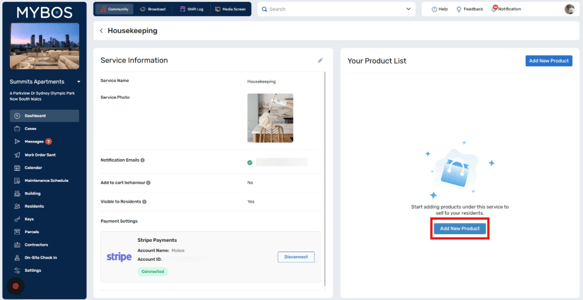
Step 8:** Enter the product name as well as other relevant service details. Click "**Save**" to finalise
❗In‑house Services uses Stripe to process payments, as a result, you will need an active Stripe account to enable any paid services. If you encounter issues setting up Stripe, please contact Stripe directly via [their support portal](https://stripe.com/au/contact)
- [Getting Started](https://support.mybos.com/knowledge-base/getting-started?hsLang=en-au)
- [Features](https://support.mybos.com/knowledge-base/features?hsLang=en-au#main-content)
- [Building Manager Dashboard](https://support.mybos.com/knowledge-base/features?hsLang=en-au#building-manager-dashboard)
- [Community](https://support.mybos.com/knowledge-base/features?hsLang=en-au#community)
- [Marketplace](https://support.mybos.com/knowledge-base/features?hsLang=en-au#marketplace)
- [Cases](https://support.mybos.com/knowledge-base/features?hsLang=en-au#cases)
- [Messages](https://support.mybos.com/knowledge-base/features?hsLang=en-au#messages)
- [Calendar](https://support.mybos.com/knowledge-base/features?hsLang=en-au#calendar)
- [Maintenance Schedule](https://support.mybos.com/knowledge-base/features?hsLang=en-au#maintenance-schedule)
- [Building](https://support.mybos.com/knowledge-base/features?hsLang=en-au#building)
- [Keys](https://support.mybos.com/knowledge-base/features?hsLang=en-au#keys)
- [Parcels](https://support.mybos.com/knowledge-base/features?hsLang=en-au#parcels)
- [Contractors](https://support.mybos.com/knowledge-base/features?hsLang=en-au#contractors)
- [On-Site Check In](https://support.mybos.com/knowledge-base/features?hsLang=en-au#on-site-check-in)
- [Troubleshooting](https://support.mybos.com/knowledge-base/troubleshooting?hsLang=en-au#main-content)
- [FAQ](https://support.mybos.com/knowledge-base/troubleshooting?hsLang=en-au#faq)
- [Administrator](https://support.mybos.com/knowledge-base/administrator?hsLang=en-au#main-content)
- [Configuration](https://support.mybos.com/knowledge-base/administrator?hsLang=en-au#configuration)
- [MYBOS Web Platform](https://support.mybos.com/knowledge-base/administrator?hsLang=en-au#mybos-web-platform)
- [Reporting](https://support.mybos.com/knowledge-base/administrator?hsLang=en-au#reporting)
- [Building Manager](https://support.mybos.com/knowledge-base/building-manager?hsLang=en-au#main-content)
- [Building Managers - Web Portal](https://support.mybos.com/knowledge-base/building-manager?hsLang=en-au#building-managers-web-portal)
- [Building Configuration](https://support.mybos.com/knowledge-base/building-manager?hsLang=en-au#building-configuration)
- [Residents](https://support.mybos.com/knowledge-base/building-manager?hsLang=en-au#residents)
- [Maintenance & Work Orders](https://support.mybos.com/knowledge-base/building-manager?hsLang=en-au#maintenance-work-orders)
- [Communication](https://support.mybos.com/knowledge-base/building-manager?hsLang=en-au#communication)
- [Community & Amenities](https://support.mybos.com/knowledge-base/building-manager?hsLang=en-au#community-amenities)
- [Reporting](https://support.mybos.com/knowledge-base/building-manager?hsLang=en-au#reporting)
- [Integrations](https://support.mybos.com/knowledge-base/building-manager?hsLang=en-au#integrations)
- [Residents](https://support.mybos.com/knowledge-base/residents?hsLang=en-au#main-content)
- [Resident App](https://support.mybos.com/knowledge-base/residents?hsLang=en-au#resident-app)
- [Resident Web Portal](https://support.mybos.com/knowledge-base/residents?hsLang=en-au#resident-web-portal)
- [MYBOS Solutions](https://support.mybos.com/knowledge-base/mybos-solutions?hsLang=en-au)
- [Feature Updates](https://support.mybos.com/knowledge-base/feature-updates?hsLang=en-au)
[](http://mybos.com)
Suite 1.01 Level 1, 6 Parkview Drive
Sydney Olympic Park
New South Wales, 2127
Australia
Copyright © 2026, mybos.com