
Why is Clearing Your Cache and Cookies Important as a MYBOS User?
MYBOS is a system that undergoes frequent updates and transformations, including behavioural changes. Consequently, users may encounter issues if their browser's cache and cookies are not cleared after an update is applied. While we understand the inconvenience this may cause, it's important to note that browser behaviour is beyond our control. Clearing the cache and cookies ensures that users are viewing the most up-to-date version of MYBOS, facilitating smoother troubleshooting and support experiences.
Note: your first move should always be to refresh your screen first using the browser icon 
Below is a shortcut to clear your cache and cookies across different web browsers and devices:
Windows
- Press Ctrl + Shift + Delete on your keyboard. This should open the options for clearing browsing data
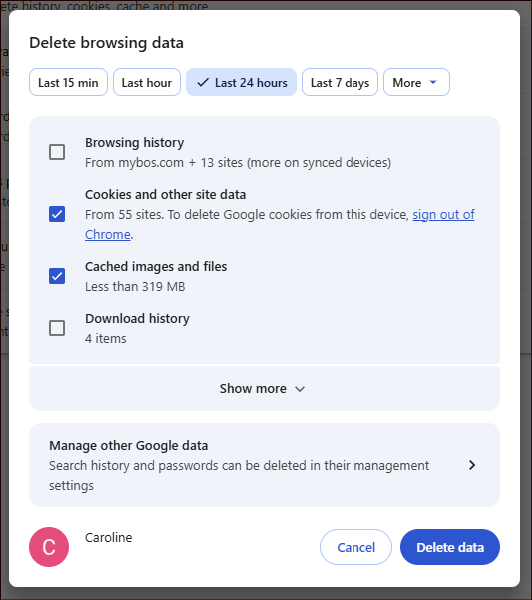
- Select Last 24 hours, and only Cookies and Cached images and files
- Click Delete data
- This will force you to log into MYBOS again, and any issues rectified
Mac
- If using Safari, use the following instructions:
- Safari -> Settings -> Privacy
- Manage Website Data…
- Search for the MYBOS site in the search box.
- Select it -> Remove.
- On other browsers, press Command + Shift + Delete on your keyboard. This should open the options for clearing browsing data
- Select Last 24 hours, and only Cookies and Cached images and files
- Click Delete data
- This will force you to log into MYBOS again, and any issues rectified