
This guide walks you through creating new wiki pages, categorising them into folders, and uploading supporting documentation for your facility.
The Wiki is your building's knowledge base. Use it to store manuals, procedures, and reference information that helps you and your team understand and operate the building, things like equipment manuals, emergency procedures, and building specifications.
How to Add Wiki Entries
Step by Step Walkthrough
Step 1: Navigate to the MYBOS Building Manager dashboard.
Step 2: Select Building from the sidebar menu.
Step 3: Click the "Wiki" card.
Step 4: To add a Wiki entry, click the blue "New Wiki" button in the top right. A pop up will launch prompting you to input Wiki Details.
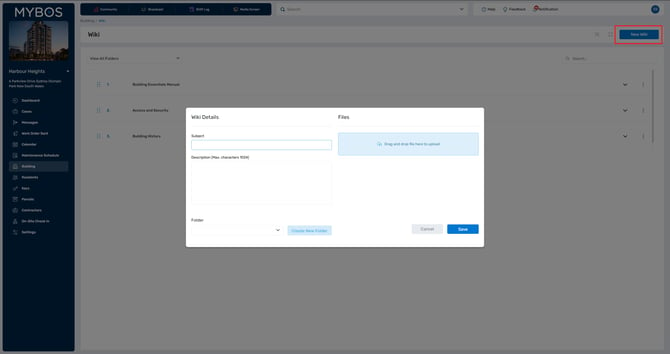
Step 5: Enter the Subject and Description of the Wiki document. The description should just be what the document is about.
Step 6: You will need to create folders to organise your Wiki documents. Click "Create New Folder". Fill out the name and click "Save"
Step 7: Upload the your document by clicking the blue upload box.
Step 8: Click Save to finalise the wiki entry.
🔁 Repeat the process for additional documents you wish to add.