---
title: Broadcasts
description: Learn how to effectively communicate community updates by broadcasting push notifications to your building's residents. This guide simplifies the process of drafting and sending important messages through the MyYBOS platform to ensure your community stays informed.
---
[Skip to content](https://support.mybos.com/knowledge-base/broadcasts#main-content)
[More support](https://support.mybos.com/knowledge-base/kb-tickets/new?hsLang=en-au)
[](https://support.mybos.com/knowledge-base?hsLang=en-au)
- [Product Updates](https://productupdates.mybos.com/whats-new)
- [Getting Started](https://support.mybos.com/knowledge-base/getting-started)
- [Building Managers](https://support.mybos.com/knowledge-base/building-manager)
- [Administrators](https://support.mybos.com/knowledge-base/administrator)
- [Residents](https://support.mybos.com/knowledge-base/residents)
- [Training Academy](https://mybos.com/support/training-academy/)
Open main navigation
Close main navigation
- [Product Updates](https://productupdates.mybos.com/whats-new)
- [Getting Started](https://support.mybos.com/knowledge-base/getting-started)
- [Building Managers](https://support.mybos.com/knowledge-base/building-manager)
- [Administrators](https://support.mybos.com/knowledge-base/administrator)
- [Residents](https://support.mybos.com/knowledge-base/residents)
- [Training Academy](https://mybos.com/support/training-academy/)
- [More support](https://support.mybos.com/knowledge-base/kb-tickets/new)
- [Contact us](https://support.mybos.com/knowledge-base/contact-us)
[Contact us](https://support.mybos.com/knowledge-base/contact-us?hsLang=en-au)
How can we help you?
- There are no suggestions because the search field is empty.
1. [MYBOS Knowledge Base](https://support.mybos.com/knowledge-base?hsLang=en-au)
2. [Features](https://support.mybos.com/knowledge-base/features?hsLang=en-au)
3. [Building Manager Dashboard](https://support.mybos.com/knowledge-base/features?hsLang=en-au#building-manager-dashboard)
# Broadcasts
## Send non-urgent updates to residents, committees and custom groups through MYBOS via email, SMS or push notification.
Broadcasts allow you to send non-urgent messages to residents, committee members, emergency contacts, investors, managing agents and other custom groups directly from the MYBOS web and mobile app.
Broadcasts are ideal for general updates such as maintenance notifications, building announcements, upcoming inspections, meeting reminders and community news that do not require an immediate response. By centralising these communications in MYBOS, you can quickly **select** your audience, **choose** the preferred delivery method (email, SMS or mobile push notification) and ensure consistent, traceable messaging across your building.
### How to use the Broadcast feature
### Step-by-step Walkthrough
**Step 1**: Click **Broadcast** in the top left of MYBOS. You will be taken directly to the **Send Message** tab.
- From here, you can toggle through the **Send Message** tab (to draft a message, **Sent Message** tab (to see all previous broadcasts) and **Scheduled** (to see broadcasts awaiting being sent)
**Step 2:** Select the users you wish to receive the broadcast. By default **All Users** is selected. Simply unselect **All users** \> Selected relevant users.
**Step 3:** Select the type of notification;
- Email
- SMS
- Mobile Push Notification (sent through the MYBOS Mobile App)
❗ If any details are missing, these can be adjusted within the **[Residents](https://support.mybos.com/knowledge-base/managing-residents?hsLang=en-au)** area.
**Step 4:** Fill out the relevant message details
**Step 5:** Click Send \> Close to dismiss the confirmation notification.
💡 You can create custom groups based on the method of communication, especially if you have members that do not have email but instead use SMS.
#### To create a custom group
**Step 1:** Click the **"+"** on the right of the **Custom Group** column
**Step 2:** Create a **Group Name** \> Select relevant users \> Press **Add** \> Click **Save**
**[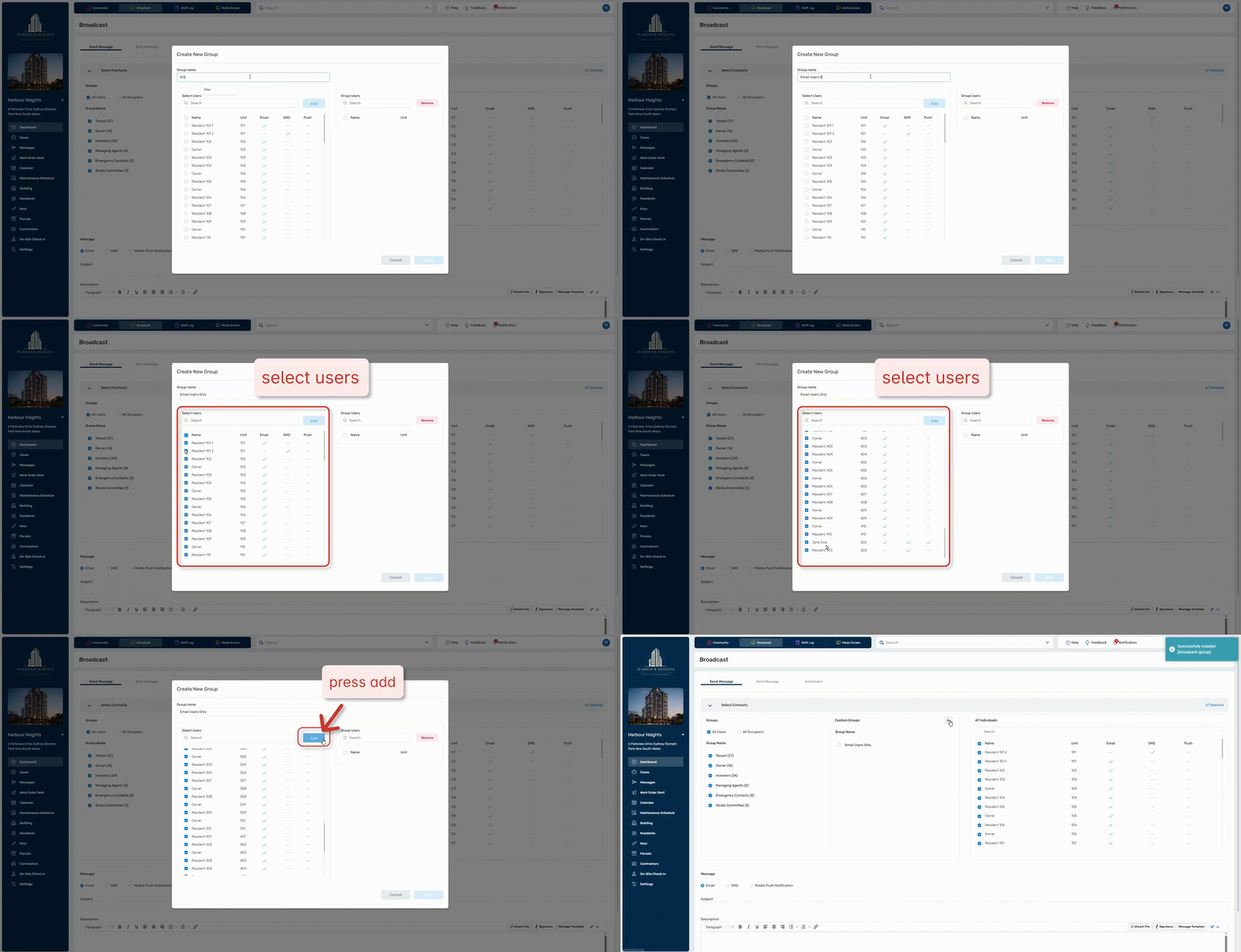](https://support.mybos.com/hubfs/Creating%20custom%20broadcast%20groups.gif?hsLang=en-au)**[Click to enlarge](https://support.mybos.com/hubfs/Creating%20custom%20broadcast%20groups.gif?hsLang=en-au)
### Frequently Asked Questions
#### What are credits?
Credits are used when you send SMS broadcasts. Each SMS message draws from the credits included in your plan, with your monthly allowance covering standard broadcast usage. If your usage exceeds that allowance, our team will contact you directly to discuss your account. A typical SMS broadcast uses approximately 2 credits.
- [Getting Started](https://support.mybos.com/knowledge-base/getting-started?hsLang=en-au)
- [Features](https://support.mybos.com/knowledge-base/features?hsLang=en-au#main-content)
- [Building Manager Dashboard](https://support.mybos.com/knowledge-base/features?hsLang=en-au#building-manager-dashboard)
- [Community](https://support.mybos.com/knowledge-base/features?hsLang=en-au#community)
- [Marketplace](https://support.mybos.com/knowledge-base/features?hsLang=en-au#marketplace)
- [Cases](https://support.mybos.com/knowledge-base/features?hsLang=en-au#cases)
- [Messages](https://support.mybos.com/knowledge-base/features?hsLang=en-au#messages)
- [Calendar](https://support.mybos.com/knowledge-base/features?hsLang=en-au#calendar)
- [Maintenance Schedule](https://support.mybos.com/knowledge-base/features?hsLang=en-au#maintenance-schedule)
- [Building](https://support.mybos.com/knowledge-base/features?hsLang=en-au#building)
- [Keys](https://support.mybos.com/knowledge-base/features?hsLang=en-au#keys)
- [Parcels](https://support.mybos.com/knowledge-base/features?hsLang=en-au#parcels)
- [Contractors](https://support.mybos.com/knowledge-base/features?hsLang=en-au#contractors)
- [On-Site Check In](https://support.mybos.com/knowledge-base/features?hsLang=en-au#on-site-check-in)
- [Troubleshooting](https://support.mybos.com/knowledge-base/troubleshooting?hsLang=en-au#main-content)
- [FAQ](https://support.mybos.com/knowledge-base/troubleshooting?hsLang=en-au#faq)
- [Administrator](https://support.mybos.com/knowledge-base/administrator?hsLang=en-au#main-content)
- [Configuration](https://support.mybos.com/knowledge-base/administrator?hsLang=en-au#configuration)
- [MYBOS Web Platform](https://support.mybos.com/knowledge-base/administrator?hsLang=en-au#mybos-web-platform)
- [Reporting](https://support.mybos.com/knowledge-base/administrator?hsLang=en-au#reporting)
- [Building Manager](https://support.mybos.com/knowledge-base/building-manager?hsLang=en-au#main-content)
- [Building Managers - Web Portal](https://support.mybos.com/knowledge-base/building-manager?hsLang=en-au#building-managers-web-portal)
- [Building Configuration](https://support.mybos.com/knowledge-base/building-manager?hsLang=en-au#building-configuration)
- [Residents](https://support.mybos.com/knowledge-base/building-manager?hsLang=en-au#residents)
- [Maintenance & Work Orders](https://support.mybos.com/knowledge-base/building-manager?hsLang=en-au#maintenance-work-orders)
- [Communication](https://support.mybos.com/knowledge-base/building-manager?hsLang=en-au#communication)
- [Community & Amenities](https://support.mybos.com/knowledge-base/building-manager?hsLang=en-au#community-amenities)
- [Reporting](https://support.mybos.com/knowledge-base/building-manager?hsLang=en-au#reporting)
- [Integrations](https://support.mybos.com/knowledge-base/building-manager?hsLang=en-au#integrations)
- [Residents](https://support.mybos.com/knowledge-base/residents?hsLang=en-au#main-content)
- [Resident App](https://support.mybos.com/knowledge-base/residents?hsLang=en-au#resident-app)
- [Resident Web Portal](https://support.mybos.com/knowledge-base/residents?hsLang=en-au#resident-web-portal)
- [MYBOS Solutions](https://support.mybos.com/knowledge-base/mybos-solutions?hsLang=en-au)
- [Feature Updates](https://support.mybos.com/knowledge-base/feature-updates?hsLang=en-au)
[](http://mybos.com)
Suite 1.01 Level 1, 6 Parkview Drive
Sydney Olympic Park
New South Wales, 2127
Australia
Copyright © 2026, mybos.com