
The Archive area is where MYBOS keeps records you have removed from day-to-day use in a building. They stay out of your active lists, but are never lost. From one page you can search through archived records, export them to Excel and restore them when you need them again.
Archive covers five types of record: Residents, Contractors, Maintenance Schedules, Assets and Inspections.
Where to find the Archive
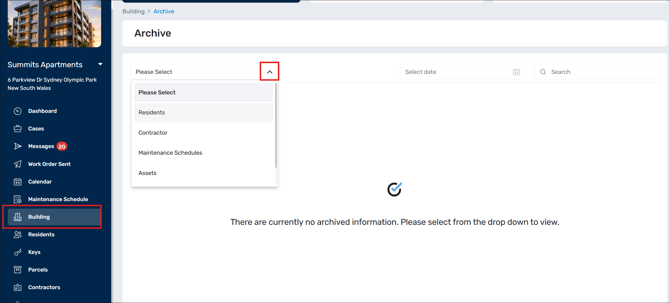
In the Manager web portal, open Building ➔ Archive.
How to use the Archive
Step 1: Go to Building ➔ Archive.
Step 2: Open the first drop-down and choose a record type: Residents, Contractor, Maintenance Schedules, Assets or Inspection.
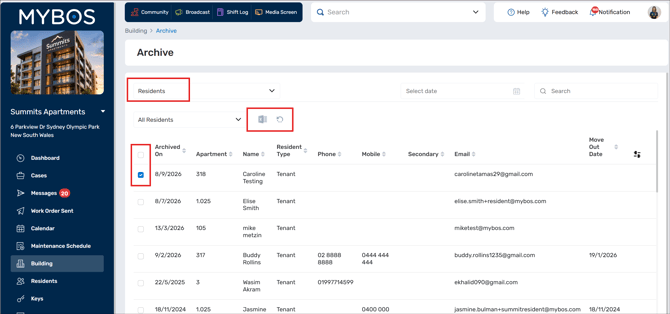
Step 3: Narrow the list if you need to. Use the Search box, or Select date to filter by date. For Residents, a second drop-down (All Residents by default) filters by resident type, such as Owner, Tenant or Managing Agents.
Step 4: Click any column heading to sort the list.
Step 5: Tick the box beside one or more records, or the box in the header row to select all of them.
Step 6: Use the icons that appear above the table: the Excel icon exports your selection, and the circular arrow icon restores it.
What each record type shows
| Record type | Columns you will see |
|---|---|
| Residents | Archived on, Apartment, Name, Resident type, Phone, Mobile, Secondary, Email, Move out date |
| Contractor | Contacts, Company, Phone, Email, Industry |
| Maintenance Schedules | Subject, Event start, Event end, Recurrence, Contractor, Asset, Document |
| Assets | Item, Category, Location, Make, Model, Asset value, Serial, Company, Purchase date |
| Inspection | Inspection name, Inspection type (Common or Private), Date and time created, Items, Completed, In progress |
Information in the Archive is for record only. It is neither editable or possible to delete.
Tips and FAQs
Why does the Archive look empty? Nothing shows until you pick a record type from the first drop-down. If a type has no archived records, the table stays empty.
Can I bring an archived record back? Yes. Select it and use the restore icon above the table.
Can I keep a copy of archived records? Yes. Select the records and use the Excel icon to export them.
How do I find one record quickly? Pick the record type, then type a name, company or subject into Search. Add a date to narrow it further.
Do I need to archive records one building at a time? The Archive is per building, so each building has its own list.